
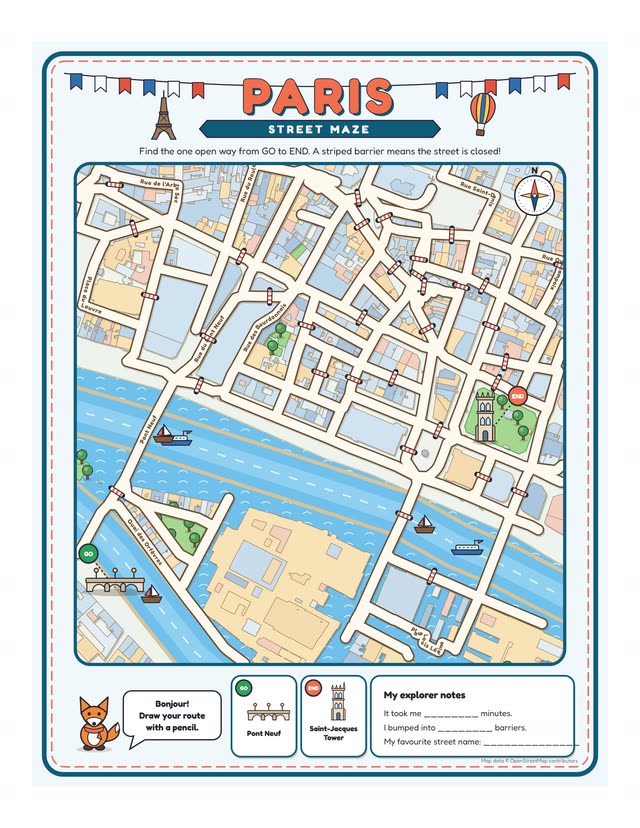
There is a particular kind of children's activity book that sells because it is not generic. A Paris maze that runs through the actual old town. A Rome tour page that stops at the actual cathedral. A Lisbon secret-message puzzle where the letters are collected along a route a family could walk the next morning. Parents buy those books for a trip, a grandparent's souvenir, or a rainy day in a hotel room, and they keep them because the child can point at the page and say "we were there."
Making one by hand is a different story. You draw the street maze, you get one road wrong, and the puzzle has no way out. Then you draw the answer page, and the second city means starting from nothing again. TripDoodle is a browser app that skips the drawing: it turns real city maps into mazes, sightseeing tours, direction puzzles and secret-message pages, draws the answer pages for you, and exports a print-ready PDF with the margins KDP asks for.
TripDoodle Starter costs $17, one time, with no subscription and no AI credits to top up. It covers 20 built and tested cities and up to 40 activity pages per book.
Get TripDoodle Starter for $17 + My Bonuses
What is TripDoodle?
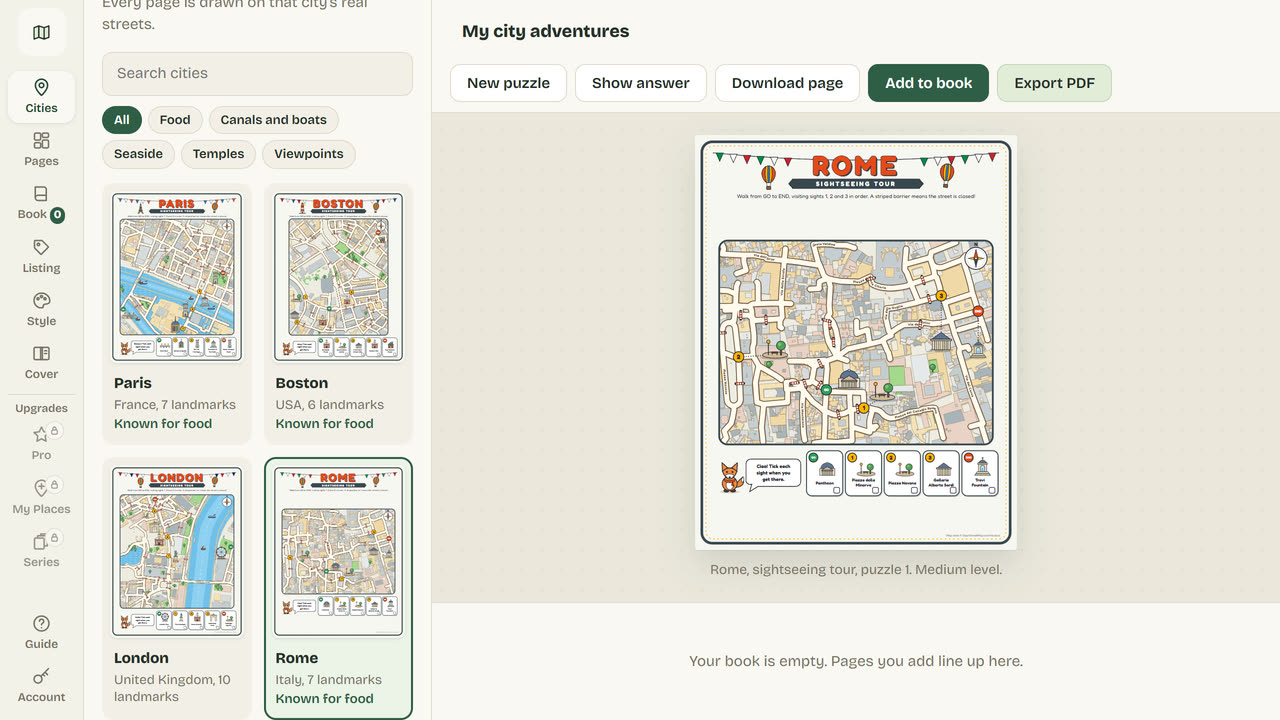
TripDoodle is a browser-based generator for children's travel activity books. You pick one of 20 city destinations, and it assembles a book from real map data: street mazes, sightseeing tours, follow-the-directions puzzles, secret messages, word scrambles, a name page, a packing list, an explorer award and an answer page for every puzzle. The output is a 300 dpi PDF at 8.5 x 11 inches.
It is aimed at Amazon KDP publishers first. The sales page is written for people who list low-content books and want a niche that is not another gratitude journal. Travel activity books for kids have a clear buyer: the parent planning a city break, the grandparent buying a souvenir, the teacher covering a European capital.
The puzzles are not clip art with a city name dropped on top. The streets, rivers, parks and buildings come from OpenStreetMap, so the maze on the Paris page is a maze through Paris. That is the whole reason the product exists, and it is worth judging it on that rather than on the page count.
What do you get with TripDoodle Starter?
Twenty cities, built and tested: Amsterdam, Athens, Barcelona, Berlin, Boston, Budapest, Florence, Istanbul, Krakow, Lisbon, London, Madrid, New York, Paris, Porto, Prague, Rome, Seville, Venice and Vienna. Eight page types, with London carrying seven because it has no follow-the-directions page.
- Street mazes. One open way through the real streets of the city.
- Sightseeing tours. Visit the sights in the right order.
- Follow the directions. Count the junctions, turn left or right, and work out where you end up.
- Secret messages. Collect letters along the route to spell the answer.
- Word scrambles. Untangle the names of the sights.
- A name page. The child's name on the front, which is the difference between a book and a gift.
- A packing list. A page to tick off before the trip.
- An explorer award. Something to hand over at the end.
Every purchase makes one finished book in a press: name page, packing list, twelve puzzles, an explorer award and the answer pages, 29 PDF pages in all. You can also choose every page yourself and grow a book to 40 activity pages, mixing cities in one book if you like.
The listing text is included too: a title, subtitle, description and keywords written from what is actually in your book, which saves the blank-page hour most KDP publishers lose before they upload anything. And the licence gives you the right to publish and sell the books you make.
How does TripDoodle work in three steps?
TripDoodle works in three steps: pick a place, press once to build the book, then download the PDF and upload it. There is no design software, no drawing and no subscription. The puzzles are calculated on your own computer, so there is no AI bill and no waiting on a server.
Here is what each step actually involves.
- Pick a place. Twenty well-known city destinations are open in Starter, each already built and tested. A book can stay in one city or mix several, which is useful for a multi-city trip.
- Build the book. One press makes a finished book: name page, packing list, twelve puzzles, an award and the answer pages, 29 PDF pages in all. Or choose every page yourself and grow it to 40 activity pages.
- Download and upload. You get the interior as a 300 dpi PDF at 8.5 x 11 inches, plus a title, subtitle, description and keywords written from what is in your book. Upload to KDP, or print at home.
Does TripDoodle make books that are actually different?
Yes, by design. Every puzzle is drawn from a number worked out from your account, so the one-press book you get is not the one the next buyer gets. Your account also starts with one of 144 mixes of colours, character and page frame, with three colour sets to switch between, and in 19 of the 20 cities one of up to four sets of landmarks.
That matters more than it sounds for anyone publishing on KDP. A template that ships the same 29 pages to every buyer is a template that gets matched against every other seller's book by the duplicate-content checks. A template that draws different puzzles and a different look per account gives two publishers two different Rome books to list.
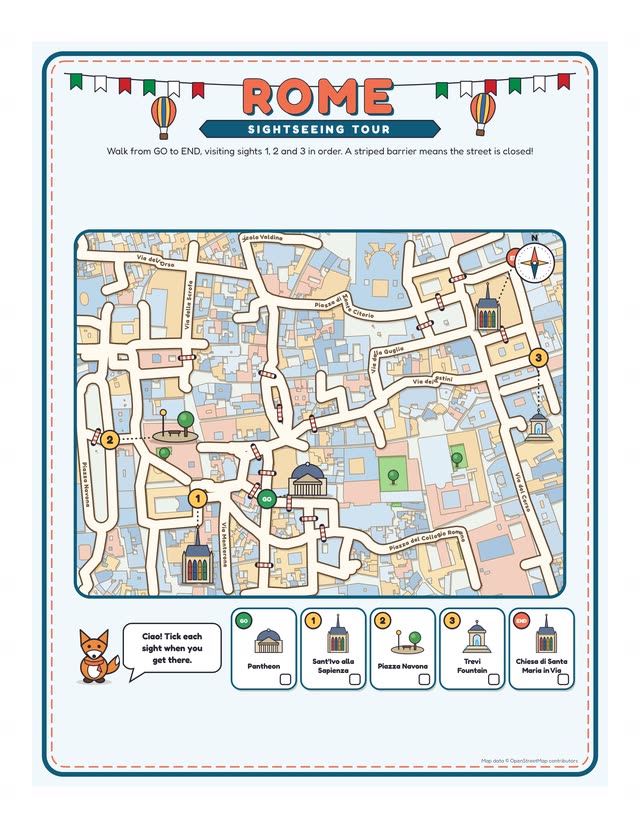
The colour is set per account as well. The page shown on the sales page is Rome in the Ocean set; the same account would see Sunset or Twilight depending on which set it was assigned. No two accounts start with the same combination.
Who is TripDoodle for?
The first buyer is the KDP publisher who already has a low-content catalogue and wants a niche with an obvious buyer. Travel activity books sit next to journals and planners in the same storefront, and the person who buys a Rome travel journal for a trip is the person who buys a Rome activity book for the child on that trip.
The second buyer is the teacher or home-educator who wants a city project that is not a worksheet. The sightseeing tour pages carry the order of the stops, and the secret messages carry the names of the sights, so a book becomes a research prompt rather than a colouring exercise.
The third buyer is the parent who wants the trip to have something in it that is not a screen. A book about the city the child is about to walk through is a different object from a generic puzzle book, and the difference is obvious on the first page.
What the product is not for is anyone who wants a business done for them. TripDoodle makes the book; publishing it, choosing the niche and writing the listing copy around it are still yours. The sales page says so plainly, which is a mark in its favour.
What bonuses do you get with TripDoodle?
TripDoodle's own package carries the interior, the answer pages and the listing text. Order through this review and my KDP Travel Book Launch Kit comes with it, delivered by email after your receipt clears.
- The City-to-Month Publishing Calendar. Twenty cities mapped against the twelve months, with the season each one sells best in, so you are not publishing a Venice book in January and wondering why nobody is browsing.
- The Listing Field Sheet. Title, subtitle, description and keyword fields laid out in the order KDP asks for them, with the character limits beside each box. It turns the included listing text into an upload you can finish in one sitting.
- The Print-and-Trim Check Card. Paper weight, gutter, bleed and margin checks for a 40-page activity book, in the order to check them before you order a proof.
- The Age-Band Page Plan. Which of the eight page types to put where for ages 5-7, 7-9 and 9-12, so a book opens easy and gets harder rather than peaking on page two.
Email support@testedapps.com with the subject "TripDoodle bonuses" and your receipt, and the kit comes back to you.
Grab TripDoodle Starter for $17 + My Bonus Kit
What should you know before you buy?
- Starter does not make a cover. The book is the interior. Use KDP's free Cover Creator or design a cover yourself; the app does not hand you a finished listing. Budget the cover time before you upload.
- The map credit has to stay in. OpenStreetMap data is free for commercial use as long as it is credited, and TripDoodle prints the credit line in the book. Removing it puts the book outside the licence.
- Twenty cities is the Starter list. The whole library is larger and the upgrades open it, so check that the city you want is in the twenty before buying for a specific trip. For most first books, Paris, Rome, London or New York is in there.
How much does TripDoodle cost?
TripDoodle Starter is $17, one time. For that you get the 20-city browser app, the eight page types, books up to 40 activity pages, the one-press finished book, the 300 dpi PDF export at 8.5 x 11 inches, the listing text generator, and the right to publish and sell the books you make.
There is no subscription, no per-page fee and no limit on how many books you make. The puzzles are calculated on your own computer, so there are no AI credits to buy and no waiting on a server.
Optional upgrades are shown at checkout, each once, each with a no-thanks link. None of them is needed to publish a Starter book.
Is $17 reasonable for a travel activity book generator?
Yes, if you price the alternative properly. One hand-drawn city maze takes hours, and the answer page is on top of that. A 12-puzzle book is a weekend of work you will redo for the next city, because a Paris maze is not a Rome maze.
A single TripDoodle book is one press. Twelve puzzles, the answer pages, the name page, the award, the listing text, all in one file. Even if you only ever publish one book, the $17 buys back the weekend; if you publish a series of the twenty cities, the price per book falls to under a dollar.
The honest limit is that the app does not judge whether a city will sell. A Rome book priced at $7.99 has a reader; a small city at the edge of the list may not. That research is still yours.
Does TripDoodle work for cities outside the twenty?
Not in Starter. Twenty cities are included, and each is already built and tested. Two upgrades extend the map: Pro opens the full library of 322 places with more page types, and My Places lets you build a book for the centre of a town, about a kilometre across, from an OpenStreetMap file.
For a first book, Starter is the reasonable choice: it is the cheapest way to find out whether the format suits your buyer and whether the pages look right in print. If you already know the city you want to publish, check the twenty-city list on the sales page first.
Final verdict
TripDoodle is a well-built niche tool with an unusually honest sales page. The puzzles come from real map data, the answer pages are drawn for you, the export is KDP-sized, and the product says plainly that it promises no sales. The one-press book is genuinely fast; the preview and page count give you control when you want it.
Four and a half out of five. The half-point is the cover: the interior generation is the hard part and it is done well, but the missing half of a KDP upload is the first thing a seller has to solve, and it would be better if the app simply made one.
Start with TripDoodle Starter for $17 + My Bonuses
Which city would you publish first, Paris or Rome, and which would sell better in the winter? Tell me in the comments.
Some links in this article are affiliate links; I may earn a commission at no extra cost to you.