
Reviewed by Kamal, TestedApps.com · 20 November 2026
Some links below are affiliate links; I may earn a commission at no extra cost to you.
If you sell digital products, you know the wall: templates and printables are easy to copy, so a store turns into a price war. Real software is the opposite — a tool a local business opens every day, paid for once, carrying the seller's name on it. Offline Apps Fortune Vol 2 gives you five finished business apps you can rebrand with your own name, logo and accent colour, then resell as your own product line. It is $17 one time, and my bonus stack comes with it through the link below.
Get Offline Apps Fortune Vol 2 + My Bonuses for $17
What do you get inside Offline Apps Fortune Vol 2?
Offline Apps Fortune Vol 2 is a bundle of five finished apps — FitBook Pro, ShotBook Pro, TermBook Pro, VowPlan Pro and NestCount Pro — each a single HTML file with a rebrand tool inside, plus a listing kit per app, customer guides, two seller guides, four bonuses and a reseller licence. One payment of $17 covers all five.
- Five working apps, one per trade. Training packages and client credits, photography shoots from inquiry to delivered gallery, lesson weeks with cancellations and makeups, a wedding guest list and budget, and a room-by-room home inventory.
- A rebrand tool inside every file. Set the product name, logo, accent colour, font and support email, then download a branded copy. No code, no build step, no installer.
- A resale licence that leaves your pricing alone. Sell branded copies at the price you choose and charge for setup, training and support; the creator takes no cut of your sales.
- A listing kit for each app. Ten images made from the real screens, the listing text and a short promo video, so a product page can go live the same week.
- Guides your customers read as yours. A two-page Start Here and a full User Guide per app, written without a company name inside them.
- Four seller bonuses. Outreach scripts, a pricing cheat sheet, a client onboarding checklist and a demo day script.
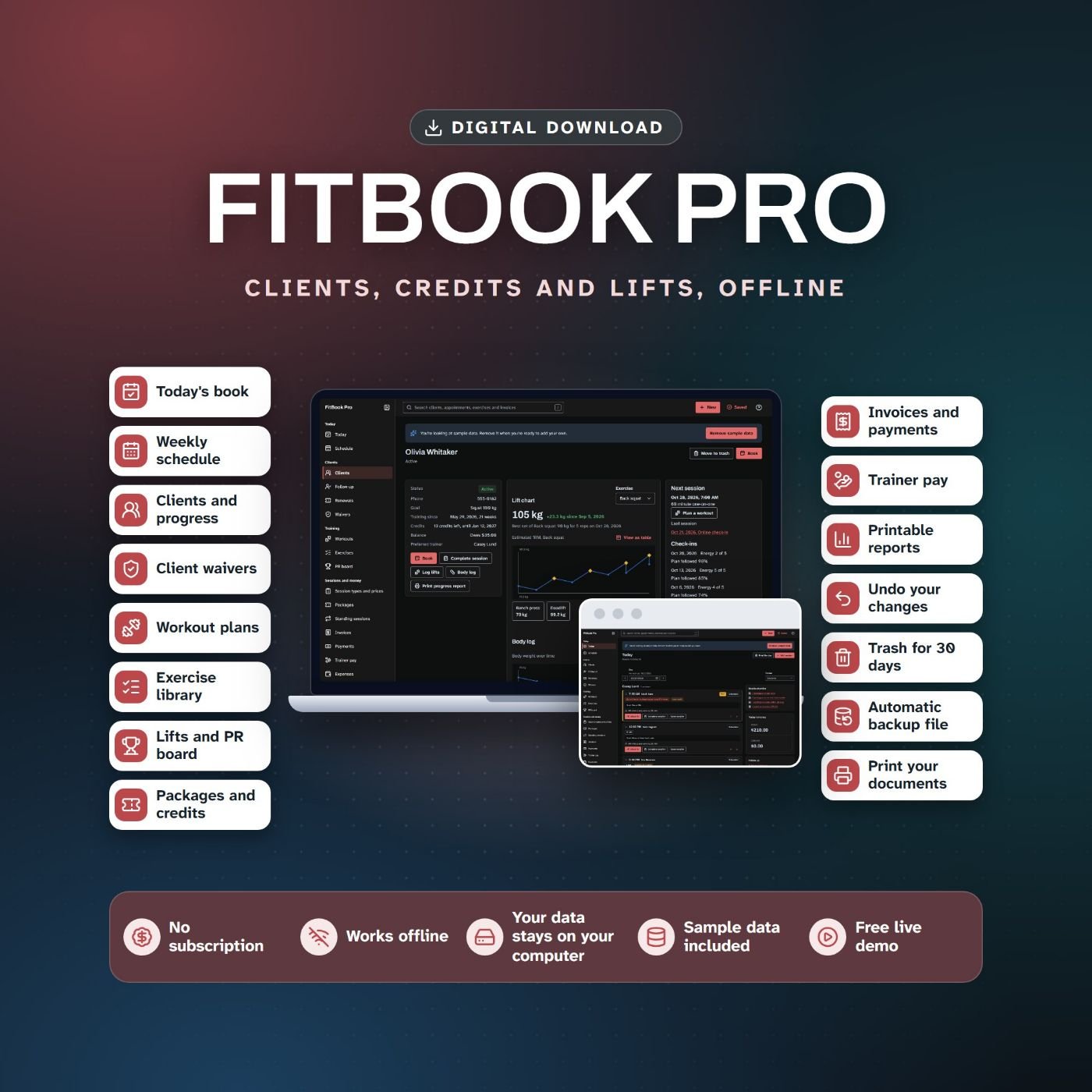
- Record protection built in. Automatic backup files in Chrome and Edge, ten daily snapshots, a 20-step undo and a 30-day trash for deleted records.
What does each of the five apps actually do?
Each app was written for one kind of buyer, in that buyer's own language. That is the difference between a generic template and a tool an owner will pay for: it already knows the words on the invoice.
FitBook Pro for trainers and online coaches
FitBook Pro opens on Today with one column per trainer, sessions in time order, and marks for a package credit, a low credit count or an expired waiver. Packages run on credits that come off as sessions are completed, a no-show is charged or a late cancel burns one by the rule you set. Workouts print with a blank Done column, and a lift chart tracks an estimated one-rep max and a PR board.
ShotBook Pro for photographers
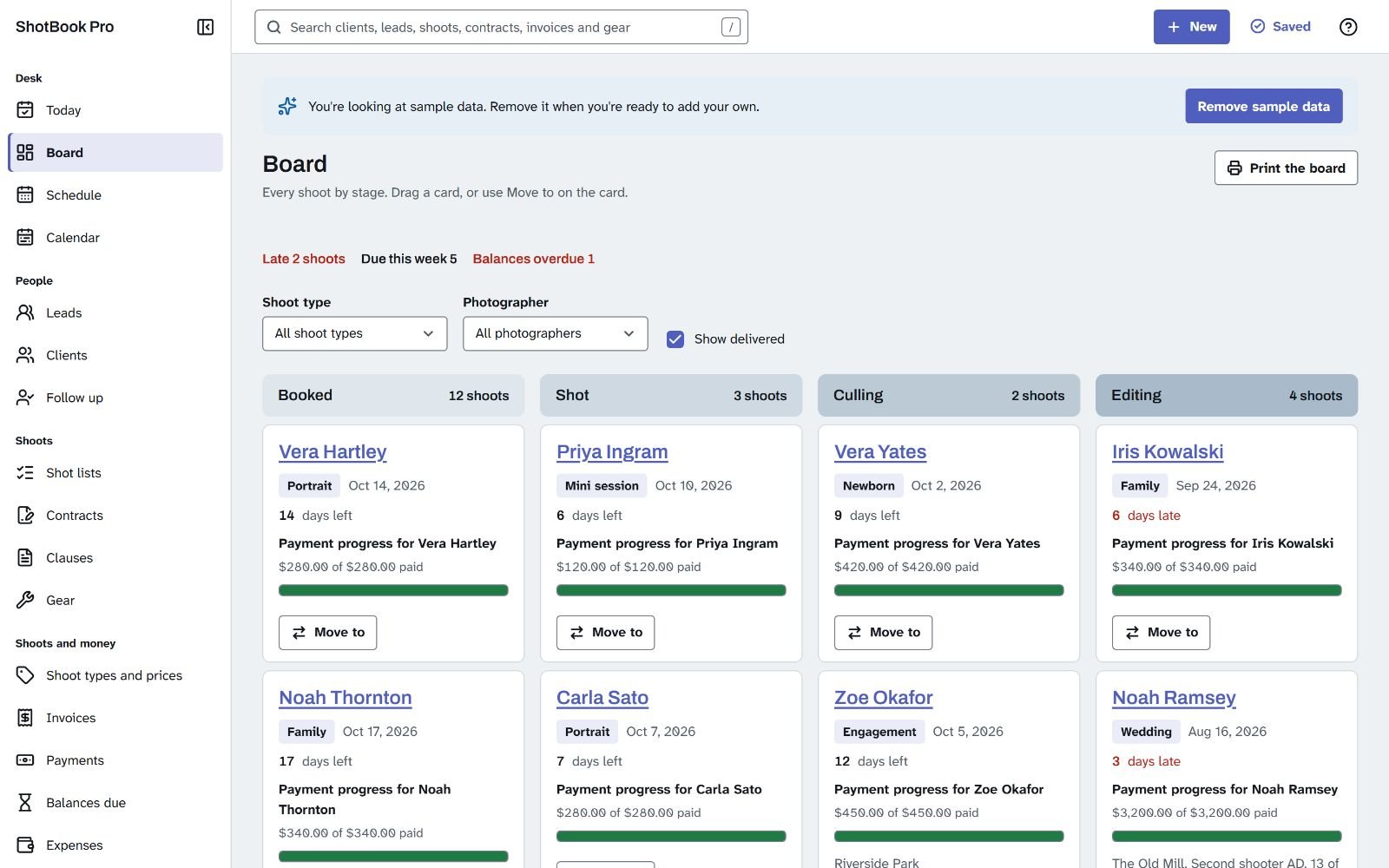
ShotBook Pro runs a workflow board: Booked, Shot, Culling, Editing, Proofing and Delivered. Each card carries the client, the shoot, the days left to deliver, a payment bar and the venue, with late and due-soon marks. Contracts print from clauses you paste once, and a payment plan works out the retainer, the instalments and the balance from the price and the shoot date.
TermBook Pro for tutors and music teachers
TermBook Pro is a teaching grid: teachers in rows, days in columns, one card per lesson with chips such as six left, last credit, makeup owed or owes 80.00. Your cancellation policy is yours to set — notice hours, a fee that depends on how late the cancel is, and a no-show charge — and the dialog applies it and tells you whether a makeup credit is owed.
VowPlan Pro for couples planning a wedding
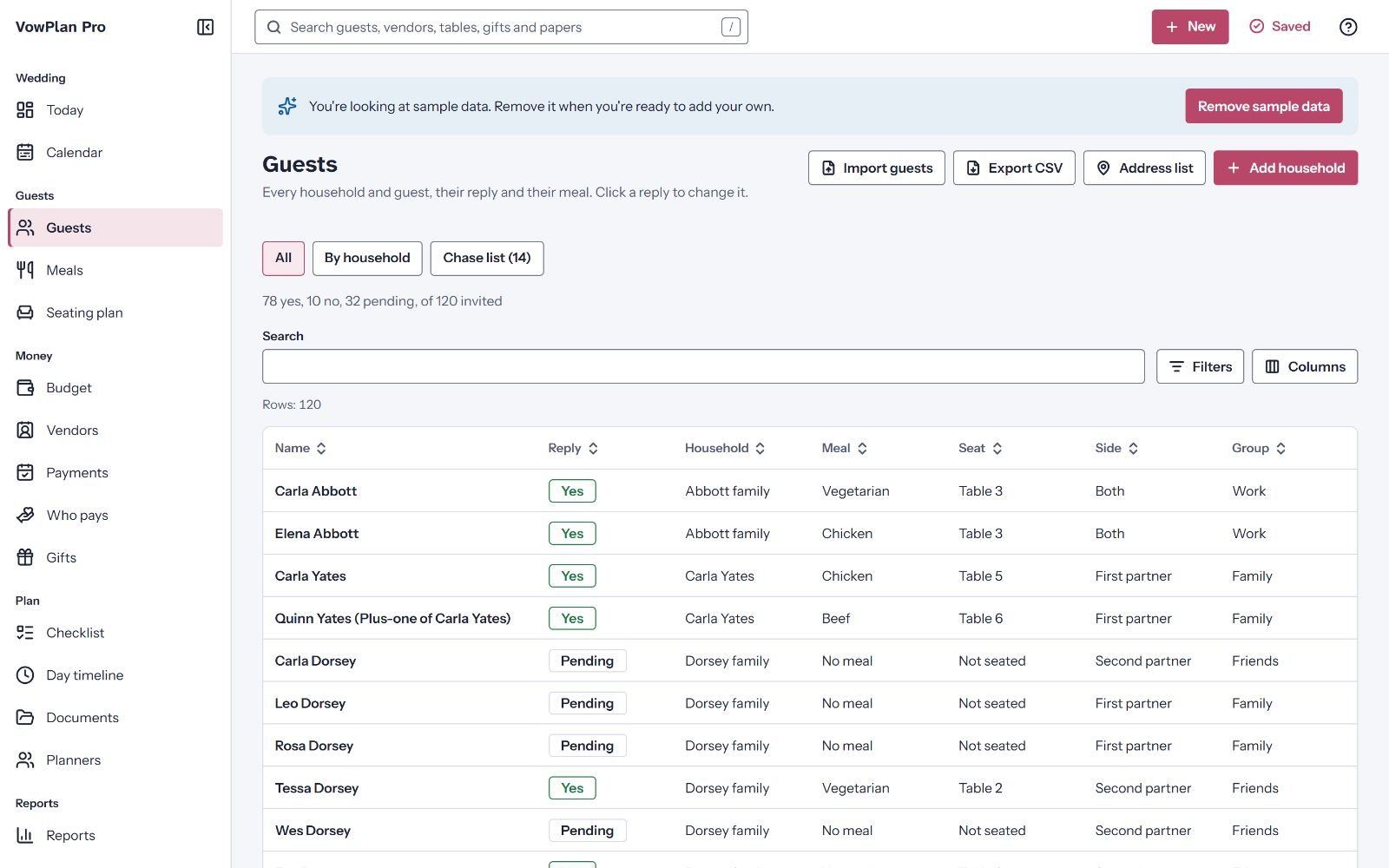
VowPlan Pro opens on Today: days to go, households still to chase, payments coming due and budget left. Every guest has an RSVP, the meals screen counts choices and dietary needs for the caterer, and the seating plan lets you drag a household to a table with a warning when a seat breaks a rule you set.
NestCount Pro for homeowners and renters
NestCount Pro catalogs each belonging with its room, photo, receipt, serial number, purchase price and replacement value, then scores documentation from 0 to 100 percent so you can see what an insurer would still ask for. Upkeep repeats on its own interval, and a claim list picks items by room after a loss.
How does the One-File Resale Method work?
The method is three steps: rebrand one app with your details, publish it through your own store or site, then sell downloads or set it up for local businesses. Each app is a single file, so there is no server to rent, no hosting bill and no monthly fee on either side of the sale.
- Rebrand an app. Open the file, go to Settings, Advanced, Rebrand this app. Type your product name, pick your logo, accent colour and font, add your support email, check the live preview and click Download branded copy. The branded copy starts empty with its own data, so real customer records never mix with the sample business.
- Put it in your store. Each listing kit holds ten images from the real screens, the listing text and a short promo video. The How to sell them guide walks through a Payhip or Gumroad store, a product-page checklist and a test purchase of your own product before you publish.
- Sell downloads or go local. Sell at the price you set, or pick one trade, message owners with the outreach scripts, run a five-minute demo from your laptop with the Wi-Fi switched off, and charge for setup, training and support.
Who is Offline Apps Fortune Vol 2 for?
It suits three kinds of seller: a digital-store owner adding a software line under their own brand, a freelancer who already serves small businesses and can charge for setup, and anyone who knows trainers, photographers or teachers locally and can demo the apps in person. You do not need to code, but you do need a way to reach buyers.
- Store owners add a product line that cannot be copied like a PDF, with five apps and matching listing assets.
- Freelancers and consultants turn an existing client list into setup, data-entry and training work.
- Owners inside these trades can run their own business on the app and offer it to peers in the same trade groups.
What bonuses do you get?
Everyone who orders through the link on this page also gets my TestedApps bonus pack, delivered by email from support@testedapps.com within 24 hours of your receipt. It is built to shorten the gap between owning the apps and making the first sale.
- Launch-page copy teardown. A marked-up breakdown of the product page I would write for a $37 branded app, with the sections in the order that sells.
- Local outreach follow-up sequence. A four-message sequence you can adapt for trainers, photographers and music teachers, plus a simple tracking sheet.
- First-five-customers checklist. A one-page plan for five real conversations in your first week without paid ads.
- Pricing sanity sheet. A worksheet comparing a one-off price, a setup fee and a small bundle so you do not underprice the support that comes with a sale.
Email support@testedapps.com with your order number and I will send the pack the same day. Claim Offline Apps Fortune Vol 2 + My Bonuses for $17
What should you know before you buy?
- The apps are built for a laptop or desktop in Chrome or Edge; the downloaded file is not supported on a phone or tablet, though the live demos do adapt to smaller screens.
- They record payments but do not take card payments, send texts or emails, or sync between devices — there is no online booking and no client portal.
- The rebrand tool changes the name, logo, accent colour, font and support contact only; the source code is not included and you cannot change screens or features.
How much does Offline Apps Fortune Vol 2 cost?
Offline Apps Fortune Vol 2 costs $17 as a one-time payment, with no monthly fee for you or for your customers. That covers all five apps, the rebrand tool, the listing kits, the customer guides, both seller guides, the four bonuses and the reseller licence. The checkout opens on 20 November 2026 at 18:00 US Central, which is 5:30 am IST on 21 November, and optional upgrades are shown at checkout.
Can you try every app before you order?
Yes. Every app has a live demo that opens the real file with a made-up sample business inside, so you can add a booking, print an invoice, delete a record and bring it back from the trash before spending anything. I opened the ShotBook Pro demo on 20 November 2026 and the workflow board loaded with sample shoots, payment bars and delivery dates.
What do buyers ask before ordering?
Do I need to know how to code?
No. The rebrand tool is a form inside each app: product name, logo, accent colour, a font from the bundled list, a Provided by line and a support email, then one click downloads your branded copy. You cannot change the screens, the features or the rules inside the app.
Can I sell the apps on any marketplace?
The resale licence does not forbid a marketplace, but every platform sets its own rules and some restrict digital products made by someone else. Your own store, your own site and direct sales to local businesses are the simplest routes, and the guide tells you to read each platform's rules first.
Do my customers need internet or an account?
No. Each app is a single HTML file that opens in Chrome, Edge or Firefox on Windows or Mac, makes no internet connections and keeps its data on the customer's own computer. Backups are written automatically in Chrome and Edge, with reminders in other browsers.
What happens after the 30-day refund window?
Every order carries a 30-day money-back guarantee: write to the product's support within 30 days of purchase and the refund is paid in full. After that the licence has no end date while you follow its terms, and the apps you have already downloaded keep working.
Is Offline Apps Fortune Vol 2 right for your business?
It is right if you already have a way to reach buyers and want a finished product to sell them this month. It is a poor fit if you want money without work, need online booking or card payments inside the apps, or expect to rewrite the software itself — the licence covers resale, not development. Judge it as a product line, not a passive-income button.
Final verdict
Rating: 4.6/5. Offline Apps Fortune Vol 2 is the cleanest white-label software offer I have reviewed this year: five finished apps that genuinely run offline, a rebrand tool that takes minutes, and a resale licence that leaves your pricing and margin alone. At $17 it costs less than a single freelance setup job, and the listing kits and seller guides remove most of the work between owning it and selling it. It will not sell itself — the buyers still come from your messages, demos and store — but the product half of the business is already done.
Start Your Offline Apps Fortune Vol 2 Line for $17
Which of the five apps would you put in front of a local business first — training, photography, lessons, weddings or home inventory? Tell me in the comments.
---
Disclosure: this review contains affiliate links, and I may earn a commission if you buy through them, at no extra cost to you. Prices, contents and availability were checked against the official product page on 20 November 2026. Background reading: white-label products and software licensing.