
Every contractor knows the moment. You walk the job, you understand the work, and then somebody asks for a number on the spot. So you round: eighteen hundred square feet, call it thirty-five hundred. The figure feels safe, it goes out as a paragraph in an email at nine at night with no scope and no terms, and you find out weeks later whether the job actually made money.
Quote Engine replaces the guess with a takeoff, a real cost and a margin you chose, then prints a one-page proposal with three honest price tiers. It is a single HTML file that runs offline, it costs $47 one-time, and buying through the link below adds my bonus stack for the quoting process around it. Get Quote Engine + My Bonuses for $47 — the full breakdown is under the screenshot.
What Is Quote Engine?
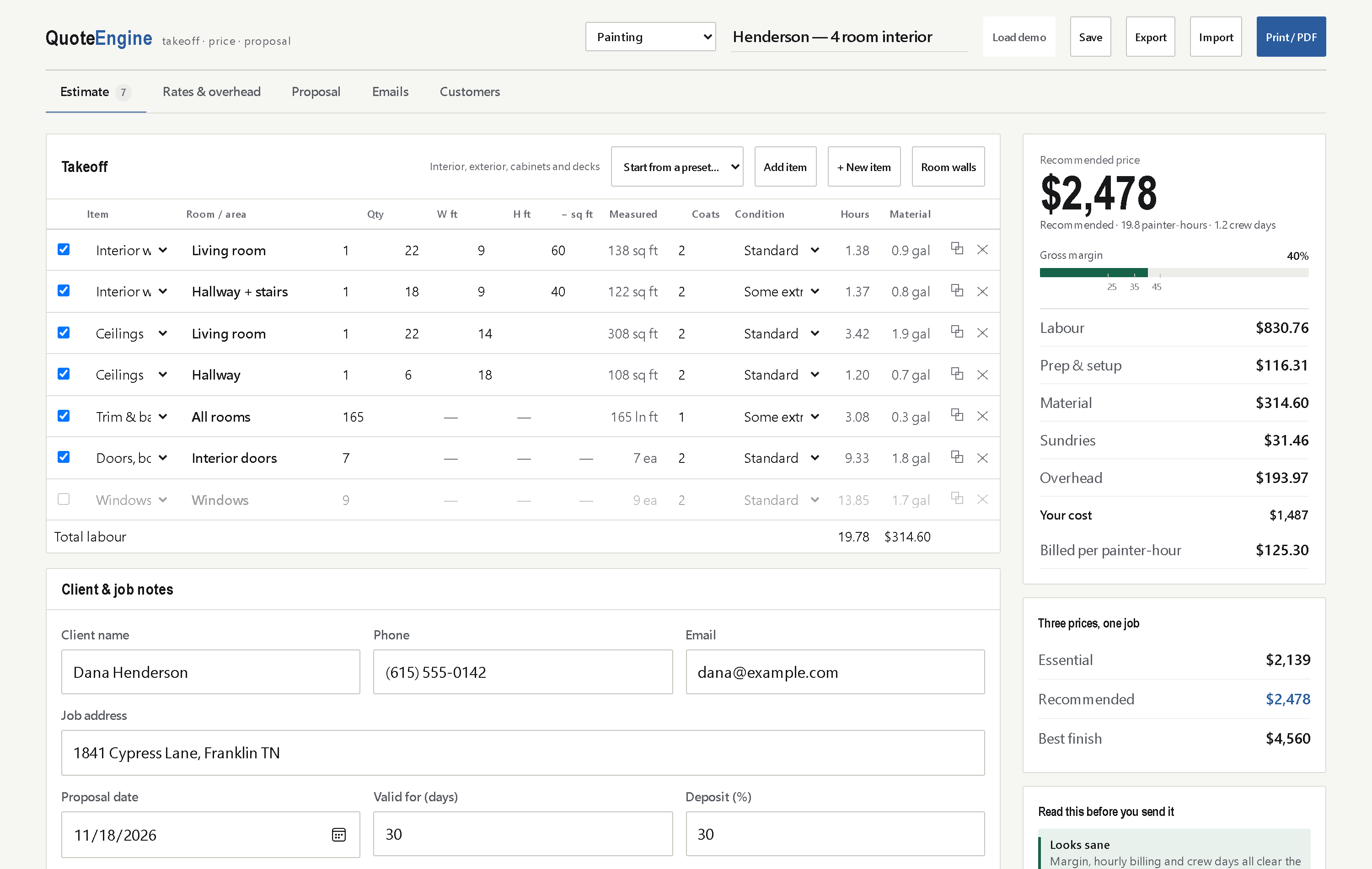
Quote Engine is a standalone estimating and proposal tool for local service contractors. You measure the surfaces on a job, it prices the real labour hours and materials, applies your overhead and a margin you choose, and prints a one-page customer proposal. It runs from one HTML file with no account, no installation and no subscription.
The whole tool fits on a single screen: the takeoff on the left, and on the right the price, what the job actually costs you, what a discount would do to the profit, and the three-tier layout the customer sees.
What Do You Get for $47?
The $47 covers the full tool and the files are yours to keep:
- A takeoff sheet for 18 trades — painting, pressure washing, roofing, flooring, fencing and decks, landscaping, drywall, handyman, cleaning, lawn care, mobile detailing, plumbing, HVAC, electrical, auto repair, locksmith and appliance repair, plus a blank custom trade.
- 132 editable line items — each row is measured the way that surface is actually measured: area for walls and ceilings, linear feet for trim and fencing, or a straight count for doors, windows and cabinet fronts.
- Five condition factors and a coats override — standard through worst case, with a per-row coats or passes setting, because the second coat is where estimates usually go wrong.
- Three to five preset scopes per trade — the usual job fills itself in, so you are editing a real starting point instead of building a takeoff from an empty table.
- The money rail — labour hours at your burdened wage, prep and setup, materials with waste, sundries and overhead, totalled into your true cost and turned into a price by one formula.
- A discount simulator — drag a slider and see the new price, the new margin and the profit you just gave away before you answer the customer.
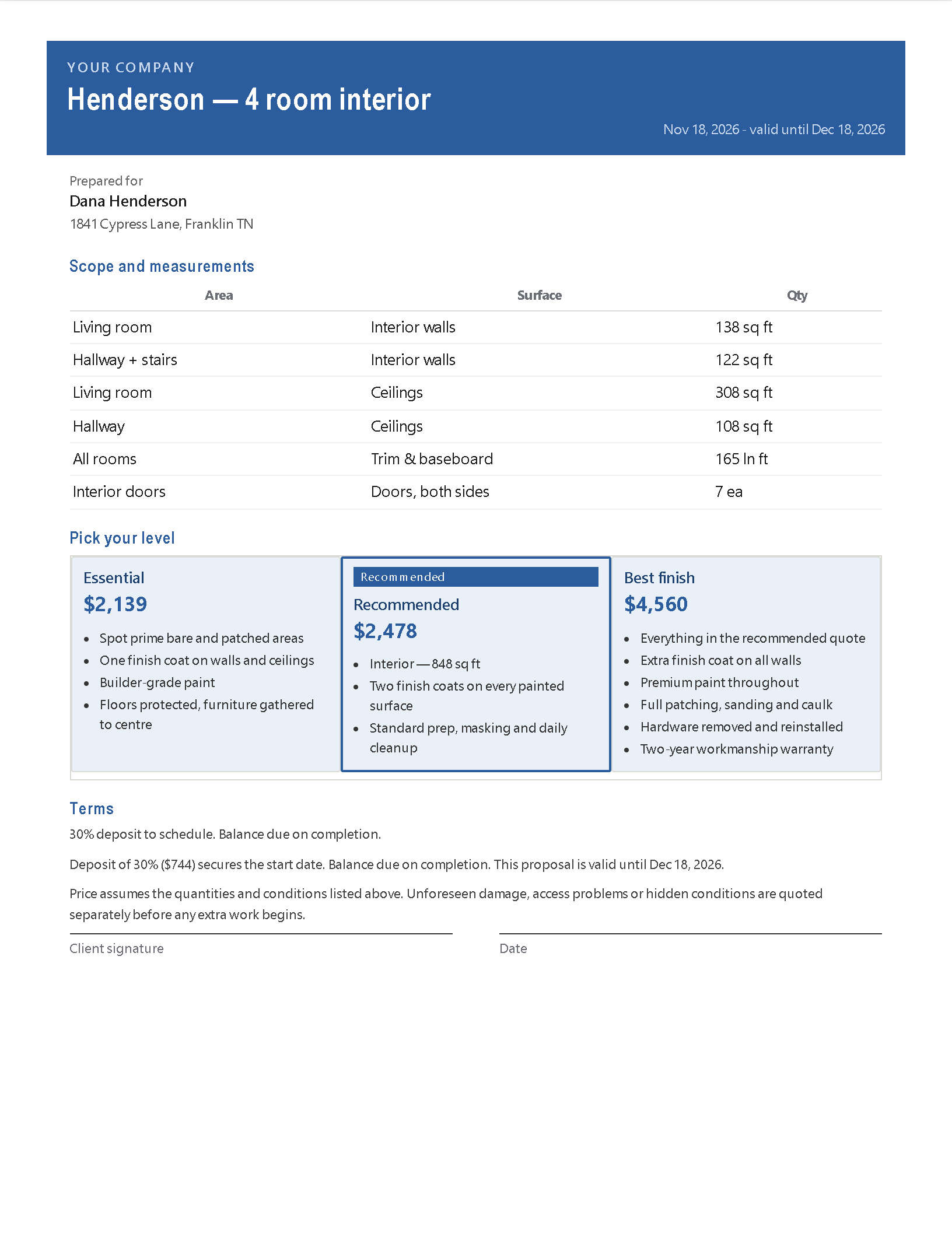
- Seven proposal themes — Takeoff, Catalogue, Card, Ledger, Poster, Minimal and Modern, each one letter page with your business name, phone and pitch.
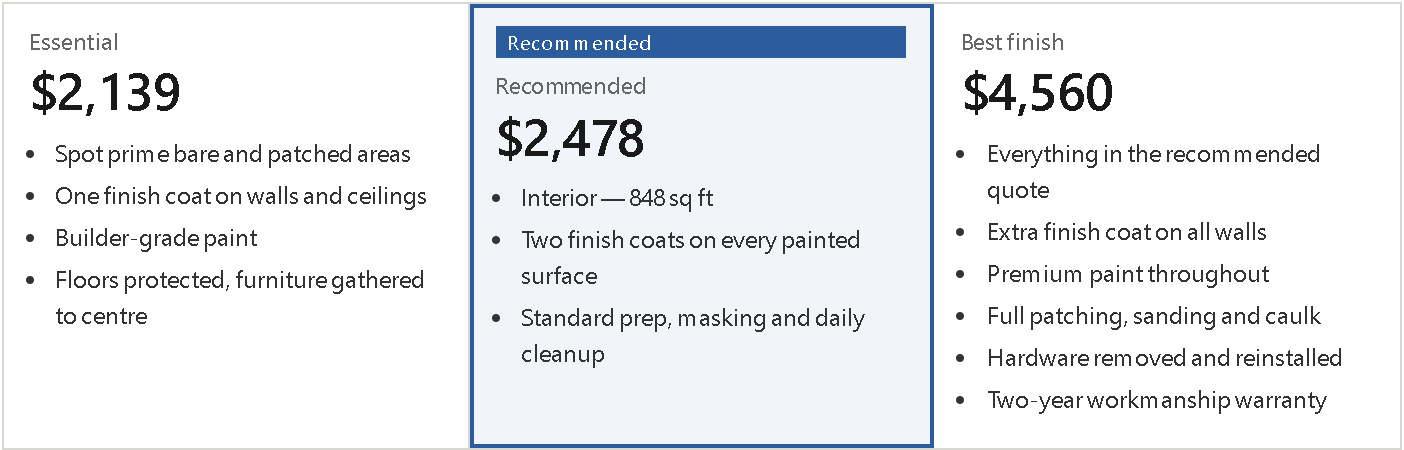
- Three price tiers — Essential, Recommended and Best finish built from the same takeoff, so the middle option is a real choice rather than a decoy.
- An email builder — quote, follow-up, booking, change order and invoice templates filled with the job's real numbers, editable and marked as sent.
- Customer memory — every saved job registers the customer with their contact details, quote history and win or loss status, grouped by month.
How Does Quote Engine Work?
Three steps, in the order the work already happens.
- Measure the surfaces. One row per surface, with the surface type deciding how it is measured. Area rows take quantity, width and height minus a deduction for windows or a fireplace; linear-foot rows convert to square feet; count rows are simply counted. Hours and material quantities calculate as you type.
- Read the money rail. Your cost builds from the bottom: labour hours times your burdened wage, then prep, then materials with waste, then sundries, then overhead. The price comes from one formula, cost divided by one minus the margin, and the margin gauge shows what the job actually earns.
- Print the page. Pick one of the seven themes, adjust the three scope tiers, add your name, phone and pitch, then print to PDF. The proposal is in the customer's inbox before you are home.
Why Does Margin Beat Markup on Every Quote?
Because they are different numbers wearing the same word. On $1,000 of cost, a 40% markup prices the job at $1,400 and leaves $400. A 40% margin prices the same job at $1,667 and leaves $667. One word in the van, two very different invoices, and the gap is a full day of somebody's labour.
Quote Engine only speaks margin, which is the number that survives a slow week. The demo job on the tool's own screen makes it concrete: $1,487.10 of cost, a recommended price of $2,478.49 and a 40% margin, with the margin gauge sitting next to the number so there is no way to quote it without seeing it.
What Does a 10% Discount Cost You?
Far more than 10% of the price. On that same $2,478 job at 40%, a customer asking for 10% off drops the price to $2,231, the margin to 33.3% and the profit by $248 — roughly a quarter of what the job was going to make. Twenty percent off takes the margin to 25% and gives up $496.
That arithmetic is hard to do on a tailgate, and it is why so many contractors say yes before they know the answer. The simulator runs it on your own numbers first, so the reply can be "yes, if we drop the ceilings" instead of a silent yes and a bad month. It is a brake, not a sales trick: you are allowed to be the cheapest quote in town, you are just not allowed to be surprised by what it cost.
Can You Send a Professional Proposal Without Design Software?
Yes. The seven themes cover the range from a tradesman's takeoff sheet, with measurements and hours visible, to a one-number poster page for jobs that sell on certainty. Each theme prints on a single letter page with your business name, phone and pitch at the bottom, and the three tiers come from the same takeoff, so the difference between them is defensible line by line.
That is the part that changes how a quote is received. The other contractor sends a paragraph with one number in it; your customer gets a page with a scope, three options and a signature block, and the price stops being the only thing there is to compare.
Who Is Quote Engine For?
The sole operator who quotes their own work gets a takeoff and a proposal out of one pass, without buying estimating software with a monthly fee or learning a spreadsheet.
The small crew gets consistency. The same trades, the same rate structure and the same proposal format on every job means the price does not depend on who happened to write the quote.
The contractor moving upmarket gets a document that reads like a company rather than a text message, which matters on larger residential jobs and anything involving a property manager.
What Bonuses Do You Get?
Buying through the link in this review adds my bonus stack for the quoting process around the tool:
- The Walkthrough Number Sheet — the six numbers to collect on every site visit, in the order the job presents them, so the takeoff happens once instead of on a second trip.
- The Discount Response Script — a one-page script for the "can you do any better on the price" moment, with the trade-offs to offer instead of a straight cut and the sentence that keeps the job alive.
- The Three-Tier Scope Wording Pack — fill-in scope bullets for Essential, Recommended and Best finish across the common trades, so the tiers read as real options rather than padding.
- The Four-Email Follow-Up Pack — day one, day three, day seven and day fourteen emails that follow a quote without nagging, each with the job's numbers dropped in.
To claim them, email support@testedapps.com with your receipt number and the email you used at checkout. Delivery is by reply, usually the same day. To take the tool and the stack together, Claim Quote Engine and My Bonus Stack for $47.
What Should You Know Before You Buy?
- You still measure the job. The tool does the arithmetic, the pricing and the page; the tape measure and the walkthrough are yours, and a takeoff is only as good as the measurements in it.
- It prices and prints; it does not run the office. It is not a CRM or a scheduling app, so job tracking and invoicing stay wherever you already keep them.
- Keep the export with the job. Save and export are manual, and the file lives on your machine, so exporting a copy per job is the habit that protects the history.
Is There a 30-Day Money-Back Guarantee?
Yes. Quote Engine comes with a 30-day refund window, and the buyer keeps the files. That is a full month of real jobs to see whether the number it recommends is the number you should have been quoting all along.
Final Verdict on Quote Engine
Quote Engine goes after the most expensive habit in the trades: pricing from a round number and finding out later what it cost. For $47 one-time you get a takeoff sheet across 18 trades, a cost build you can defend, a margin gauge, a discount simulator that ends the guesswork, and seven proposal themes that make the quote look like it came from a company. It will not measure the job for you, and it will not chase the customer, but the pricing decision it sits behind is the one that decides whether the year works.
Start Pricing Your Next Job With Quote Engine for $47
---
Some links in this article are affiliate links; I may earn a commission at no extra cost to you.