
Reviewed by Kamal, TestedApps.com · 20 November 2026
Some links below are affiliate links; I may earn a commission at no extra cost to you.
If you have ever opened a blank n8n canvas at 9pm and closed it at midnight with two half-working nodes to show for it, the cost is not the tool — it is the hours. Automation Vault sells the shortcut instead: 20,000+ finished workflow files you import, add your own API keys to, and run the same evening. It launched on 20 November 2026 at $27 one time, and the cart is open now.
Get the Automation Vault bundle for $27
What do you get inside Automation Vault?
Automation Vault is a download of 20,000+ pre-built n8n workflow files in standard .json format across nine categories, plus a commercial licence and six training bonuses, sold as a one-time $27 purchase. You import a file into your own n8n instance, attach your credentials, and the workflow runs on your data rather than on a demo.
What you are buying is a starting point that is already 90% wired: triggers, nodes, webhook paths, retry logic and the connections between apps are set, and you change the account keys, the limits and the copy. That is a different product from a course or a prompt pack — the thing you receive is files that n8n itself reads.
The page bundles in more than the templates. A commercial licence lets you deploy and resell the automations as client work, a six-hour video curriculum covers node architecture and error handling, and a self-hosting blueprint targets a $4–5 per month VPS if you would rather not pay for n8n Cloud.
What do the nine categories actually contain?
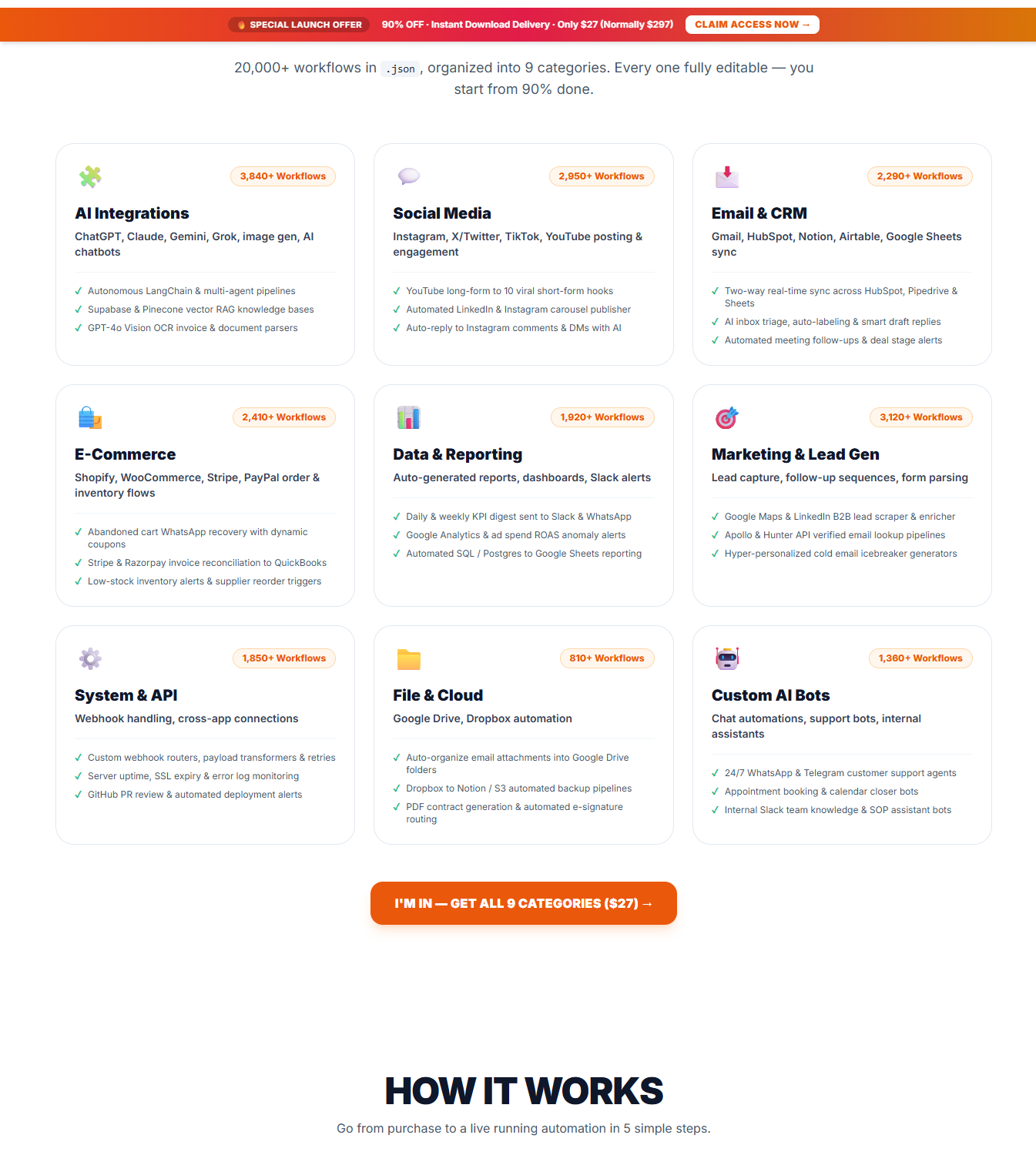
The nine categories are AI Integrations, Social Media, Email & CRM, E-Commerce, Data & Reporting, Marketing & Lead Gen, System & API, File & Cloud and Custom AI Bots. Their card counts on the product page read 3,840, 2,950, 2,290, 2,410, 1,920, 3,120, 1,850, 810 and 1,360 — about 20,550 in total, which is the arithmetic behind the 20,000+ headline.
Broken down by what each one is for:
- AI Integrations (3,840+). ChatGPT, Claude, Gemini and Grok chains, image generation, chatbots, LangChain and multi-agent pipelines, vector RAG setups on Supabase and Pinecone, and GPT-4o Vision document parsers.
- Social Media (2,950+). Long-form video to ten short-form hooks, automated LinkedIn and Instagram carousel publishing, comment and DM replies.
- Email & CRM (2,290+). Two-way sync between HubSpot, Pipedrive, Notion, Airtable and Google Sheets, plus inbox triage and draft replies.
- E-Commerce (2,410+). Shopify, WooCommerce, Stripe and PayPal flows — abandoned-cart recovery through WhatsApp, invoice reconciliation, low-stock reorder triggers.
- Data & Reporting (1,920+). Daily and weekly KPI digests to Slack or WhatsApp, ad-spend and ROAS anomaly alerts, SQL and Postgres reporting into Sheets.
- Marketing & Lead Gen (3,120+). Google Maps and LinkedIn lead scraping, Apollo and Hunter email verification, personalised cold-email openers.
- System & API (1,850+). Webhook routers, payload transformers, retry handlers, uptime and SSL-expiry monitors, GitHub pull-request alerts.
- File & Cloud (810+). Drive and Dropbox sorting, attachment archiving, PDF contract generation and e-signature routing.
- Custom AI Bots (1,360+). WhatsApp and Telegram support agents, appointment-booking bots, internal Slack knowledge assistants.
The counts are the vendor's own labels on the cards, and I could confirm the sum rather than the depth inside each file. The category names do line up with how the workflows are sold: an invoice parser sits under AI Integrations, and an abandoned-cart sequence sits under E-Commerce.
How does importing a workflow actually work?
Importing takes five steps: download the bundle, unzip it, open your n8n canvas, use Import from File or paste the JSON onto the canvas, then attach credentials and run. n8n's own documentation describes the same import path, so the file format is the platform's, not a vendor workaround.
- Buy and download. The order page delivers the
.jsonbundle instantly; there is no licence server and no account to create on the vendor's side. - Pick one workflow, not forty. Open the folder for a category, sort by name, and take a file whose trigger you recognise — a webhook, a schedule, or a form submission.
- Import it. In n8n, choose Import from File and select the
.json, or press Ctrl+V on an empty canvas with the JSON on your clipboard. - Attach credentials. Every node that touches an outside service needs your own key or OAuth connection — Gmail, Slack, OpenAI, Stripe, Shopify, whatever the flow uses. n8n stores these under Credentials, so one Google connection serves many workflows.
- Adjust and run. Change the schedule, the sheet ID, the model, the message copy, then run once on a test record before pointing it at live data.
The import itself is seconds. The real time goes into step four, and that is true of any template you buy: the file cannot contain the seller's credentials, so the first run always needs your keys. Anyone promising one-click with no setup is selling around the step that matters.
Who is Automation Vault for?
It suits three buyers: a freelancer or small agency selling automation as a service, a business owner who already uses n8n and wants a library instead of a build queue, and a marketer who needs repeatable posting, reporting and lead-gen flows without hiring a developer. It is a poor fit for someone with no n8n instance and no intention of learning the interface, because no template removes the credential step or the concepts of triggers and nodes.
- Agency and freelancers. The commercial licence is the reason this one makes sense commercially: import a flow, rebrand the messages, charge a setup fee and a monthly retainer.
- Small businesses already on n8n. A vault turns "we should automate the invoice chase" into a fifteen-minute import that references a workflow someone else already debugged.
- Content and marketing sellers. The social and lead-gen folders are the highest-density sections after AI, which matches where most solo operators actually lose hours.
What bonuses do you get?
The six vendor bonuses are included in the $27 and valued at $924 on the page: an n8n video masterclass ($197), a self-hosted unlimited cloud blueprint for a cheap VPS ($147), a pre-trained AI prompt and persona library ($97), a webhook and API troubleshooting playbook ($97), an agency client reselling and packaging guide ($247), and access to a private automation builders community ($139).
Ordering through the link on this page also gets you my TestedApps bonus pack, delivered by email from support@testedapps.com within 24 hours of your receipt. It is built for the gap between owning 20,000 files and landing the first paid build.
- First-import checklist. The order I would import in, which categories to try first, and the three checks that stop a template from running on live data.
- Client proposal skeleton. A one-page scope, timeline and price frame for selling an automation build, adapted from real retainer conversations.
- Credential hygiene sheet. How to keep client API keys separate, what to ask for in writing, and what never to store inside a workflow file.
- Pricing sanity sheet. A worksheet comparing a one-off build fee, a setup fee and a monthly retainer so you do not give away the support work.
Email support@testedapps.com with your order number and I will send the pack the same day. Claim the vault with my bonuses
What should you know before you buy?
- The 20,000+ figure is the vendor's count of files, not a promise about quality: the nine cards sum to about 20,550, and how much dead weight sits inside each category only shows after you unzip it.
- The sales page promises a 30-day money-back guarantee, while the checkout I opened on 20 November 2026 showed a 5-day money-back line — read the guarantee text on the payment page before you pay.
- Every workflow needs your own API keys, an n8n instance and, for most AI folders, a paid model subscription; the $27 covers the files and the licence, not the apps they connect to.
How much does Automation Vault cost?
Automation Vault costs $27 as a one-time payment. I opened the checkout on 20 November 2026 at 21:00 IST and the order total read USD $27.00, with no recurring charge, on a licence the order page labels Extended, which includes commercial use. The page shows $297 as the regular price and calls the $27 a 91% launch discount, so treat the higher number as a reference price rather than a fee you avoided.
There is no subscription in the offer and lifetime access is stated on the page, including future weekly drops. The cart is open now: the launch ran at 02:00 US Eastern on 20 November 2026, which is 12:30 IST the same day, and the order form was live when I checked it nine hours later.
What do buyers ask before ordering?
Do I need to know how to code?
No. The workflows are visual n8n graphs and you edit them in the browser interface; the only code you are likely to touch is an occasional JavaScript expression inside a node, and the included curriculum covers exactly that. You do need to be comfortable with API keys and OAuth logins.
Does it work on n8n Cloud and self-hosted?
Yes. The files are standard n8n workflow JSON, so they import into both the official Cloud plans and self-hosted instances on Docker, Railway, DigitalOcean or a plain VPS. The self-hosting bonus exists precisely for buyers who want unlimited executions on a cheap server.
Can I sell the automations to clients?
Yes. The licence is described as a full commercial agency licence: deploy the workflows inside client accounts, charge for the build and for ongoing support, or package them into your own offer. Your clients' accounts and keys stay yours to manage.
Is this a subscription?
No. It is a single $27 payment with lifetime access to the bundle, and the page adds future weekly drops at no extra cost. Nothing in the checkout recurs, which is unusual at this price point and is worth confirming against the order email.
Is Automation Vault right for your automation business?
It is right if you already have an n8n instance, or plan to stand one up this week, and you sell — or want to sell — automation as work. It is wrong if you want finished automations with your keys pre-wired, or if you expect the library alone to find clients. Judge it as a parts catalogue: the value is in how quickly you can take a file, adapt it and put it in front of a paying use case.
Snapshot of what this review covered on 20 November 2026:
- Verified first-hand: the sales page contents and category counts, the live checkout total of USD $27.00, the file format and the platform's documented import path.
- Not verifiable before purchase: template-by-template quality, the real depth of each category, and the delivery speed of the bonus masterclass.
Final verdict
Rating 4.6/5. Automation Vault is a well-priced parts catalogue for n8n: 20,000+ importable workflow files, a commercial licence that opens client work, and six bonuses that cover the setup learning curve — for $27, less than one hour of a developer's time. The honest caveats are the ones every template library carries: the counts are the vendor's, quality varies by file, and your keys and your judgment do the last 10% that makes a workflow useful. If you sell automation or run n8n for your own business, it is a cheap way to skip the blank canvas.
Start importing your first workflow today
Which category would you open first — AI Integrations, E-Commerce or Email & CRM? Tell me in the comments.
---
Disclosure: this review contains affiliate links, and I may earn a commission if you buy through them, at no extra cost to you. Prices, contents and availability were checked against the official product page and its checkout on 20 November 2026. Background reading: workflow automation, n8n's import documentation and the n8n source repository. More launch reviews live at the TestedApps FAQ archive, the TestedApps Tumblr and the TestedApps MolecularCloud profile.